
There are many options for configuring Drupal search to suit your needs. To make search adjustments to specific content, visit the 'Advanced Settings' section of the edit screen.
On this page:
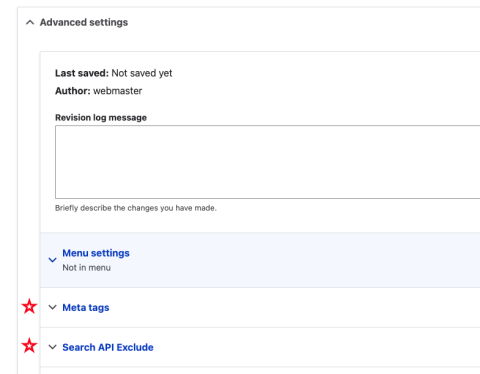
Meta Tags
Meta Tags are HTML tags used to provide additional information about a page to search engines and other clients (this helps with SEO optimization).
- Basic Tags: Simple meta tags. Each field has descriptive text under it defining what the tag does and how to populate it.
- Advanced: Meta tags that might not be needed by many sites. Each field has descriptive text under it defining what the tag does and how to populate it.
- Open Graph: The Open Graph meta tags are used to control how Facebook, Pinterest, LinkedIn and other social networking sites interpret the site's content. The Facebook Sharing Debugger lets you preview how your content will look when it's shared to Facebook and debug any issues with your Open Graph tags. Each field has descriptive text under it defining what the tag does and how to populate it.
Search API Exclude
Select this option to prevent the node (content) from being indexed (marked) by search engines.
Keywords
Keywords are a tool in Drupal that allows certain words to be added to the keyword field that may not be found in the body content (note: your site may not have this feature). This is used by the internal search to help rank the content higher for certain words. Here is an example of when adding keywords are helpful. For an 'Aquatics' page, many site visitors could potentially search for 'swimming' or 'pool' instead of Aquatics. We suggest you use these words within the content to help with search, but they can also be added as keywords to help.