Opening Links in New Tabs

To optimize navigation and coherence, the Web Content Accessibility Guidelines suggest that most links on a website should open in the same tab; this includes documents, menu items, and most webforms. Still, there are occasions in which opening a link in a new tab is best practice, such as when using external links to direct users to a third party site. When done correctly, forcing links to open in a new tab can increase your website overall accessibility. 

How To Force Links to Open in a New Tab

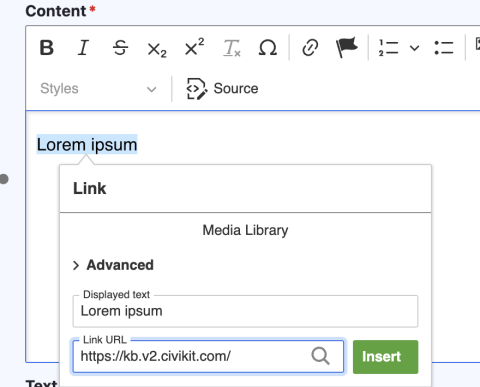
  1. In a content row, add your desired link text.
  2. Highlight the link text, and select the link icon in WYSIWYG.
  3. Add the your desired URL to the link field and select 'Insert'.
    Image
    A highlighted section of text. Next to it is a pop-up where a user can add their link URL. Next to the URL field is a green 'insert' button.
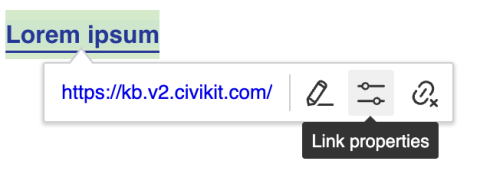
  4. Once the link is active, click on the link text and select the 'Link properties' icon.
    Image
    A highlighted section of text next to a pop up. The middle icon shows two toggles and the help text reads 'Link properties'.
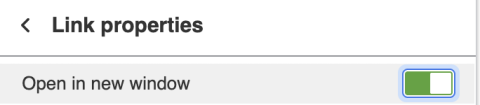
  5. A new pop-up will appear, with 'Open in new window' as an option. When this switch is toggled on, it will appear green.
    Image
    A detail view of the 'Link properties' section with a toggled that reads 'Open in a new window'. The toggle is green showing it has been switched on.